TDM 19000: Removing One Object from an Image
The "remove from image" feature that is now commonly found in media editing tools uses AI to remove people, objects, and text while automatically smoothing and filling in the background. This technique of editing within the image is called inpainting (vs. "outpainting" where they extrended beyond the boundaries of the images). In an endless, almost magical take on this, Adobe’s article on "What is inpainting?" helps to showcase some of the extreme (and hard to put into practice) possiblities of inpainting.
The tools in Photoshop have been developed by a number of people over a long period of time. That is to say, the inpainting we will be doing will be nowhere that fancy. We will start by just removing one person.
To get started, we are going to take the mask of the selected person, and convert it to be a binary mask.
|
The cv2.inpaint() function from OpenCV is what is going to be editing the image. However, this does require the mask to either be 0 (keep) or 255 (remove) values. |
mask = masks[0][0].numpy()

# make binary mask (0 or 255)
mask = mask.astype(np.uint8) * 255
The cv2.inpaint() function requires some information before it can be used:
-
chosen image
-
mask layer
-
inpaintRadius
-
flags
Use the original image (no masks or object shapes), and the defined binary mask. The general range for the inpaintRadius is size 3 to 9 - this determines which surrounding pixels are included by distance - so choose a value accordingly. The flags are the algorithm used; there are two standard flags - cv2.INPAINT_NS, and cv2.INPAINT_TELEA. For this inpainting, use cv2.INPAINT_TELEA. This method is reliably fast and high quality.
|
cv2.inpaint() requires images to be in the BGR color format. The first line of the code below takes the selected image and reads it in using cv2.imread(), which is in BGR by default. |
import cv2

image_bgr = cv2.imread(image_path)

my_result = cv2.inpaint(
    image_bgr,
    mask,
    inpaintRadius=7,
    flags=cv2.INPAINT_TELEA
)
To display the results of this:
plt.imshow(cv2.cvtColor(my_result, cv2.COLOR_BGR2RGB))
plt.axis("off")
plt.show()
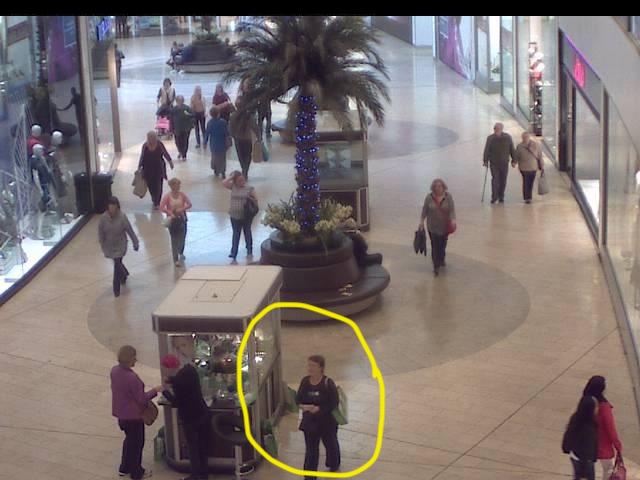
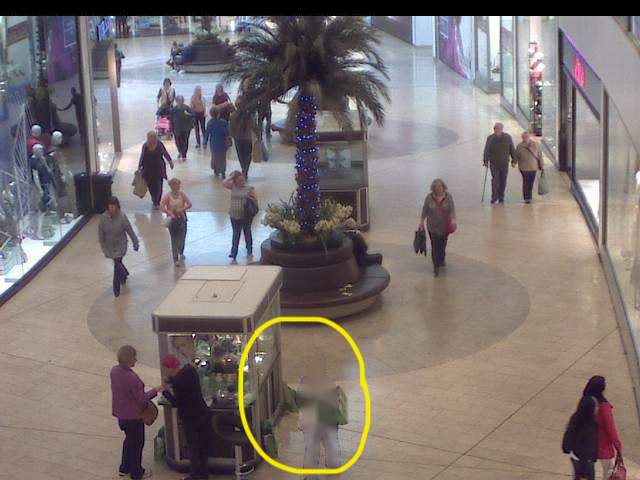
There is a subtle change here (the images below have been drawn on to point out the differences). The person in blue with the green bag has more or less disappeared into the abyss.