TDM 20100: Project 1 — Fall 2026
-
Introduction to Large Language Models
Motivation: Our goal in Project 1 is to get familiar with leverage LLMs from Ollama. We use Jupyter Lab on the Anvil computational cluster. In this first project, it is OK to ask many questions and to explore! (It is always OK to ask questions.) We are happy to have you continue to participate in this experience.
Context: In The Data Mine, we do not require any background or prerequisites. It is OK if this is your first time building LLMs from first principles. No background is needed. We aim to give practical examples and to always be "learning by doing."
Scope: Anvil, Jupyter Lab, LLMs
Make sure to read about, and use the template found here, and the important information about project submissions here.
The link to Piazza is: piazza.com/purdue/fall2026/tdm10100
(Yes, we will share a Piazza site with TDM 10100 this semester.)
|
The projects are usually due on Wednesdays. You can see the schedule here: the-examples-book.com/projects/fall2026/20100/projects Please do not wait until Wednesday to complete and submit your work! |
Download the project template, as described here: https://the-examples-book.com/projects/templates
When you first open the template, you may get a pop-up asking you to select what kernel you’ll be using. Select the seminar kernel (not the seminar-r kernel). If you do not get this pop-up, you can also select a kernel by clicking on the upper right part of your screen that likely says something similar to No Kernel, and then selecting the kernel you want to use.
We give some information about kernels here: the-examples-book.com/projects/kernels
|
If AI is used in any cases, such as for debugging, research, etc., we now require that you submit a link to the entire chat history. For example, if you used ChatGPT, there is a "Share" option in the conversation sidebar. Click on "Create Link" and please add the shareable link as a part of your citation. The project template in the Examples Book now has a "Link to AI Chat History" section; please have this included in all your projects. If you did not use any AI tools, you may write "None". We allow using AI for learning purposes; however, all submitted materials (code, comments, and explanations) must all be your own work and in your own words. No content or ideas should be directly applied or copy pasted to your projects. Please refer to GenAI page in the examples book. Failing to follow these guidelines is considered as a violation of academic integrity. |
|
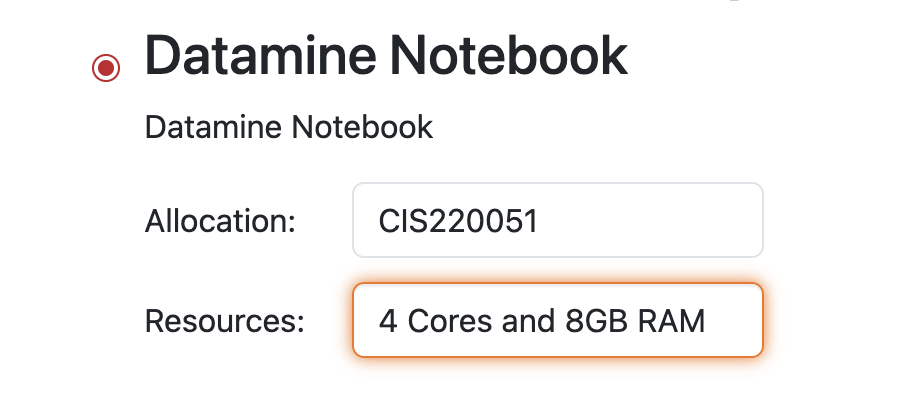
During week 1, in your Jupyter Lab session, please be sure to use The Data Mine Jupyter Labl notebook, with 4 cores per session. |
Questions
Question 1 (2 pts)
A Large Language Model (LLM) is a type of artificial intelligence that is designed to understand, process, and generate text in a human-like fashion. These models are trained using self-supervised machine learning on vast amounts of data. A common reason this is done is to complete natural language processing tasks - such as language generation that you will find in AI chatbots.
Ollama is a tool that lets you run LLMs locally on your computer or a server without too many complex commands. Rather than calling an online API, Ollama downloads the chosen model and runs in directly in your environment. Ollama lets you :
-
download AI models,
-
run them locally,
-
ask them questions (from the command line),
-
customize and build models.
We want you to getting starting by opening a terminal and starting an Ollama server running. Some guidance about this is given here:
Show the output from:
/anvil/projects/tdm/bin/ollama serve
and also show the output from:
/anvil/projects/tdm/bin/ollama ps
-
After starting the Ollama server, show the outputs from the two commands above.
-
Be sure to document your work from Question 1, using some comments and insights about your work.
Question 2 (2 pts)
Following the information here:
Be sure to setup your scratch directory, and download llama3.2.
Afterwards, create three llama models, namely:
a llama3.2-1 model that uses 1 thread,
a llama3.2-2 model that uses 2 threads, and
a llama3.2-4 model that uses 4 threads.
Then show the models that you have created, by running this in bash:
/anvil/projects/tdm/bin/ollama list
-
After creating the models, show that you have all three of them, by running the output of the bash command above.
-
Be sure to document your work from Question 2, using some comments and insights about your work.
Question 3 (2 pts)
Now consider the examples from this file:
We want you to demonstrate that your llama3.2-4 model is the fastest, and llama3.2-2 model is slower, and the llama3.2-1 model is the slowest, by running a query with three different models, as discussed in the section on "Testing the Ollama Model".
Show the timings of your query on each of these 3 models.
-
Demonstrate that your llama3.2-4 model is the fastest, and llama3.2-2 model is slower, and the llama3.2-1 model is the slowest, by running a query with three different models. Show the timings of your query on each of these 3 models.
-
Be sure to document your work from Question 3, using some comments and insights about your work.
Question 4 (2 pts)
Create a new llama3.2 model that talks like a pirate. Ask it a few questions and demonstrate that it can talk like a pirate.
Create another new llama3.2 model that talks like a very grouchy elderly man who does not like people who ask questions. Ask it a few questions and demonstrate how it talks.
-
Demonstrate your ollama model that talks like a pirate.
-
Demonstrate your ollama model that talks like a grouchy old man.
-
Be sure to document your work from Question 4, using some comments and insights about your work.
Question 5 (2 pts)
For the last question, customize your model in a way of your own choosing. Tell us how you customized it, and then demonstrate how it works. You have some freedom and flexibility on this one.
-
Tell us how you customized a model in a way of your own choosing, and then demonstrate how it works.
-
Be sure to document your work from Question 5, using some comments and insights about your work.
Submitting your Work
Please make sure that you added comments for each question, which explain your thinking about your method of solving each question. Please also make sure that your work is your own work, and that any outside sources (people, internet pages, generative AI, etc.) are cited properly in the project template.
Congratulations! Assuming you’ve completed all the above questions, you’ve just finished your first project for TDM 20100! If you have any questions or issues regarding this project, please feel free to ask in seminar, over Piazza, or during office hours.
Prior to submitting your work, you need to put your work into the project template, and re-run all of the code in Jupyter Lab and make sure that the results of running that code is visible in your template. Please check the detailed instructions on how to ensure that your submission is formatted correctly. To download your completed project, you can right-click on the file in the file explorer and click 'download'.
Once you upload your submission to Gradescope, make sure that everything appears as you would expect to ensure that you don’t lose any points. We hope your first project with us went well, and we look forward to continuing to learn with you on future projects!!
-
firstname_lastname_project1.ipynb
|
It is necessary to document your work, with comments about each solution. All of your work needs to be your own work, with citations to any source that you used. Please make sure that your work is your own work, and that any outside sources (people, internet pages, generative AI, etc.) are cited properly in the project template. You must double check your Please take the time to double check your work. See here for instructions on how to double check this. You will not receive full credit if your |